

An order comes in while you are out for lunch. A renewal payment fails on a Saturday morning. A product sells out and you only notice on Monday. Until now, doing anything about it meant finding a laptop and logging in to the Joomla administrator.
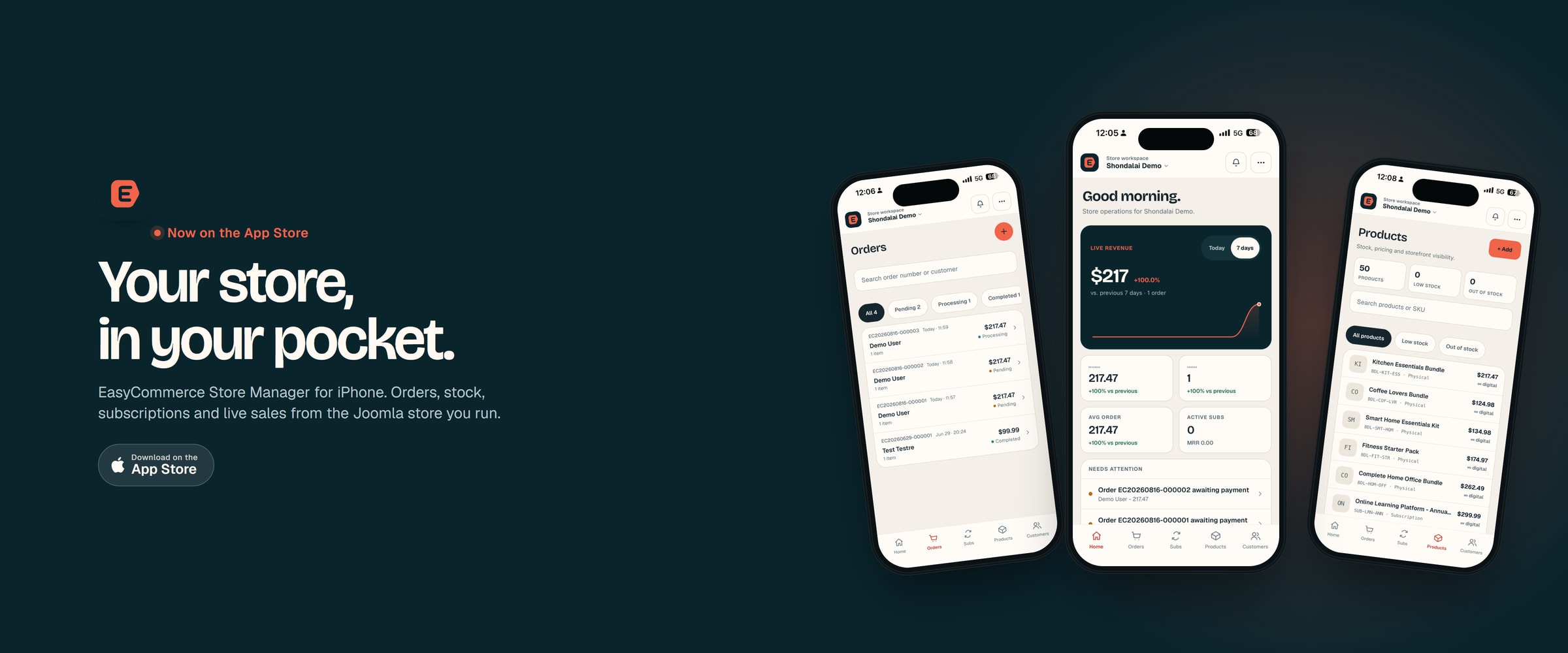
Today that changes. EasyCommerce Store Manager, our iPhone app for EasyCommerce stores, is now on the App Store. It connects directly to your own site and lets you handle the everyday work of running a store from your phone. It is free to download. Android will follow.
Download EasyCommerce Store Manager on the App Store
Now available on Google Play Store - Download Now
What you can do from your phone
See how the store is doing
The app opens on a dashboard. Revenue for today or the last seven days, order count, average order value, and active subscriptions with their monthly recurring revenue. Under that is a short list called Needs Attention: orders waiting on payment, renewals that failed, products running low. On most mornings that list is the whole reason to open the app.
If you run more than one EasyCommerce site, link them all and switch between stores from the header.
Deal with orders, not just look at them
Search orders by number or customer, filter by status, and open any order for the full picture. From there you can mark it paid when money arrives outside the store, mark it fulfilled once it ships, retry a payment that did not go through, or refund and cancel it.
You can also create an order on the spot for an existing customer, pick the products, and either record a manual payment or send them a payment link. Handy when someone orders over the phone or at the counter.
Keep stock honest
Stock counts drift. When you spot it, fix the count right there instead of writing yourself a note. Take a product offline until it is back, or put it back on sale. Simple and digital products can be created and edited from the app as well, so a quick price change does not have to wait for the desk.
Customers and subscriptions
Look up any customer and see their orders, lifetime value and average order. You can add a customer or update their details too. If you sell subscriptions, the app shows what is active, on trial, past due or paused. Pause, resume, retry a failed renewal, or cancel when a customer asks. You can also start a subscription for a customer manually.
Reports
The reports screen shows revenue with the change against the previous period, orders, average order value and refunds, plus top products and the payment method mix. Pick 7, 30 or 90 days.
Know the moment something needs you
Turn on push notifications and the app tells you when a new order arrives or a subscription renewal fails. You choose the alerts for each store. If you would rather have quiet, leave them off and check in when it suits you. There is also a notifications screen inside the app with recent activity worth a look, including new reviews and low stock.
Connecting your store takes about a minute
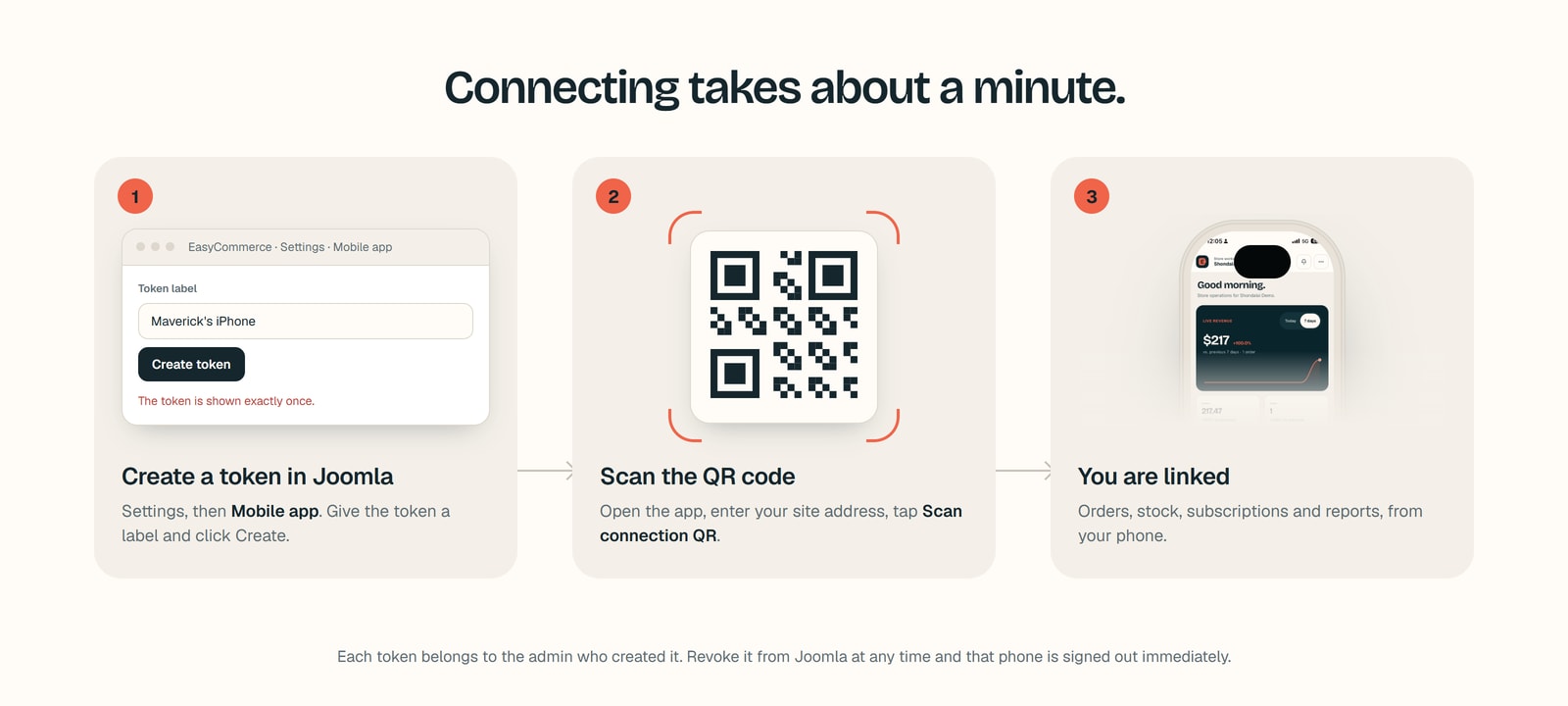
- In your Joomla administrator, open EasyCommerce, go to Settings and choose Mobile app under Integrations.
- Give the token a label, something like "Priya's iPhone", and click Create token. A QR code appears. The token itself is shown only once.
- Install EasyCommerce Store Manager from the App Store and open it.
- Enter your site address, tap Scan connection QR, and point the camera at the code. That is it.
If you would rather not use the camera, copy the token from Joomla and paste it into the app instead.
Your site stays in control
- Every token is tied to the administrator who created it, so the app can only do what that person is allowed to do in Joomla.
- Tokens are kept in the iPhone keychain, not in plain text.
- The Mobile app screen lists every token and when it was last used. Revoke one and that phone is signed out immediately. A lost phone or a staff change is a single click.
- Your orders, customers and products travel directly between the app and your own site. None of it is stored with us.
Push notifications are the one piece that involves us, because Apple only delivers alerts through a registered service. Your site sends the alert to the Shondalai push relay, which passes it on to your phone. The alert carries the order number and amount, never customer details. You switch this on with the Connect button in the same Mobile app settings screen. It needs the EasyCommerce Push Relay plugin enabled and an active EasyCommerce licence.
What you need
- A Joomla site running EasyCommerce 1.1.5 or later. The current release is 1.2.1, and updating first is the simplest way to be sure.
- An iPhone running iOS 16.4 or later.
- An administrator account on the store you want to manage.
- For push notifications, the Push Relay plugin and an active EasyCommerce licence.
Android is next
We started with iPhone because we had to start somewhere. The Android app is built from the same code and is next in line. We will post here when it is ready.
Get the app
EasyCommerce Store Manager is free on the App Store.
Download EasyCommerce Store Manager for iPhone
Download EasyCommerce Store Manager for Android
This is version one. If something doesn't work the way you expect, or you wish the app had a certain screen, tell us on the EasyCommerce support forum. What goes into the next version depends a lot on what we hear.